
Defra spreadsheet and API errors: what they mean and how to fix them
In short: when Defra's Report receipt of waste service can't accept your spreadsheet, it emails it back with the errors written into column A and the cells at fault in red. One mistake stops every load in the file, and fixing the first round of errors can bring a second. Below is each error, what it means and how to fix it, taken from the code Defra publishes for the service and its own tests. Software that reports through Defra's API meets the same checks, so the same fixes apply.
How Defra tells you about an error
When you upload the template, it's checked after you've uploaded it, not while you wait. You get an email either way:
- If it's accepted, the email has your spreadsheet back with each load's Waste Tracking ID written into column B of the "Waste movement level" tab.
- If it isn't, the email has your spreadsheet back marked up. Column A of each tab, "Errors found in your waste movements", lists the problems in that row, each followed by the cell it's about, such as
postcode must be in valid UK or Ireland format (S9). The cell at fault is in red on pink, and a required cell left empty now reads "Please provide a value".
Three things catch people out:
- It's all or nothing. If any row in the file has an error, none of its loads is accepted, not even the good ones. Until the whole file goes through, none of those loads counts as reported.
- It's checked in two rounds. First Defra reads the file: the references that link the two tabs, the Waste Tracking ID column, and how codes and weights are written. Only when that's clean are the details of each load checked against Defra's rules. So fixing the first round's errors can bring a second round you couldn't have seen before. That's normal, not a new problem.
- Warnings aren't shown. A load with no disposal or recovery code is accepted, and nothing in the returned spreadsheet says so. The regulations still ask for the D code or the R code (or both) for each waste code, so don't take silence as approval.
However you're told, GOV.UK says an error you're told about must be corrected within the same 2 working days as the original report. With an all-or-nothing upload, one bad row on Monday can hold up the whole week's loads.
The column letters in this guide are those of the current template, whose data tabs are "7. Waste movement level" and "8. Waste item level", with the first load on row 9. Defra's code already reads a newer version laid out differently, so if your template doesn't match, go by the column headings.
Errors with the file itself
| What you see | What it means and how to fix it |
|---|---|
The selected file must be a XLSX | Only an Excel workbook (.xlsx) is taken. A .xls, .xlsm, .csv or .ods file is refused at upload. Open it in Excel and save it as an Excel Workbook. |
The selected file must be smaller than 2 MB | Split the loads across two spreadsheets, or check you haven't pasted in images or thousands of empty formatted rows. |
| An email saying the upload failed, with no marked-up copy | Defra couldn't recognise the file as its template. It looks for the template's title on the first tab and the two data tabs by name. Copying the data into a blank workbook, renaming or deleting tabs, or changing the layout all stop it being read, which the template's guidance warns about. Download a fresh template and paste your rows in as values. |
First-round errors: reading the spreadsheet
These come before any of a load's details are checked. Each load is matched between the two tabs by "Your unique reference": column C on the movement tab, column B on the item tab.
| What you see | What it means and how to fix it |
|---|---|
Please provide a value (C9) | A required cell is empty. In column C of the movement tab, that's the load's unique reference, such as your weighbridge ticket or transfer note number. A cell holding only a space counts as empty. |
No waste items for unique reference (C16) | The load on that row has no rows on the item tab with the same reference. Check the reference is spelt exactly the same on both tabs, with no extra spaces, and that every load has at least one waste item. |
No waste movements for unique reference (B17) | The other way round: a waste item whose reference isn't on the movement tab. |
Duplicate reference | Two loads on the movement tab have the same reference. Each load needs its own; give a load with several waste codes one row on the movement tab and one row per code on the item tab. |
No movements recognised (C9) | Nothing was found where the loads should start. Make sure your first load is on row 9 and the rows above it are as the template left them. |
Waste Tracking ID must not be present on a create upload (B9) | Column B is filled in on a new upload. Leave it empty: Defra writes the ID there. It's only filled in to update a load Defra already has (below). |
Waste Tracking ID is required (B10) | The opposite, on an update: every load you're changing needs the Waste Tracking ID Defra gave it. |
Cannot parse disposal / recovery codes (R1 = 50 = Kg) (R11) | Column R of the item tab couldn't be read. Each code is written as code = weight = unit = estimate or actual, and several are separated by semicolons: D12 = 30 = kg = Estimate; R10 = 10 = kg = Actual. Defra's own example above fails because it stops after the unit. One code on its own, such as R3, is also taken, and covers the item's whole weight; two bare codes, or a code and a weight with nothing after, can't be read. Grams, g, kilograms, kg and tonnes are understood; write tonnes in full. |
Cannot parse component codes, Cannot parse component names or Cannot parse estimate. | A POPs or hazardous components cell couldn't be read, or "Is the waste weight estimated?" (column J) is empty. Components are written as name = concentration, separated by semicolons: Cadmium = 50; Trichloroethylene = 25, with the concentration as a number of mg/kg. The estimate column takes Yes or No. |
Second-round errors: Defra's checks on each load
These are the rules Defra applies to every load, whether it arrives by spreadsheet or through the API. On the spreadsheet the start of each message is shortened to the field's name, so the API's "carrier.address.postcode" must be in valid UK or Ireland format becomes postcode must be in valid UK or Ireland format (S9).
EWC codes (column C of the item tab)
| What you see | What it means and how to fix it |
|---|---|
ewc codes must be a valid 6-digit numeric code (C9) | Usually Excel's doing. Type 010101 and Excel keeps 10101, dropping the leading zero; type some codes and it turns them into a date. Either way Defra no longer sees six digits. As the template says, start the code with an apostrophe ('010101) so Excel keeps it as typed. Spaces between the pairs (17 01 01) are fine on the spreadsheet, as Defra strips them; through the API the code must be six digits with no spaces. Several codes for one item go in the same cell, separated by semicolons, up to 5. |
| A message saying the code must be from the official list | Six digits, but not a code on Defra's list, often a typo or a heading such as 170000. Check it against the template's "EWCs" tab or our EWC code finder. |
Hazardous waste and the consignment code (columns L and M, and the item tab)
| What you see | What it means and how to fix it |
|---|---|
reason for no consignment code is required when wasteItems[*].ewcCodes contains a hazardous code and hazardousWasteConsignmentCode is not provided (M9) | A waste item on that load has a hazardous EWC code, one marked with an asterisk in the list, and the load has neither a consignment code (column L) nor a reason for not having one (column M). It's triggered by the code alone, even if you answered "No" to "Is the waste hazardous?". Fill in the consignment note's code, or pick a reason: NO_DOC_WITH_WASTE (no documentation came with the waste), HWRC_RECEIPT (a household waste recycling centre receipt) or NON_HAZ_WASTE_TRANSFER. If the code is wrong and the waste isn't hazardous, correct the EWC code instead. |
| A message listing the valid consignment code formats | The code is filled in but isn't in a shape Defra takes. In England and Wales it's two or more letters or numbers, a slash, then five letters or numbers, sometimes followed by a letter: CJTILE/A0001. A SEPA code is SA, SB or SC and seven digits; an NIEA code is DA, DB or DC and seven digits, both in capitals with no spaces. |
| A message that hazardous property codes are required | With "Is the waste hazardous?" set to Yes, the item needs at least one hazardous property code in column O, from HP_1 to HP_15 or HP_POP, and how you determined the components in column Q. HP1, HP 1 and HP01 are all read as HP_1; several are separated by semicolons. |
concentration operator must be [>] (P14) | A hazardous component can be "more than" a concentration (Lead => 1200) but not "less than". POPs can take either. |
| Messages about POP components | POPs are given by their code from the template's "POP name and codes" tab, such as ALD = 50, not by name, so "Aldrin" isn't recognised. If you say the details came from guidance or your own testing, list at least one component. If you say they weren't provided, list none. |
Disposal and recovery codes (column R of the item tab)
| What you see | What it means and how to fix it |
|---|---|
code must be one of [R1, R2, … D15] (R9) | The code isn't one of R1 to R13 or D1 to D15: a typo, a code that doesn't exist such as R14, or a word like "Recycling". Our guide to disposal and recovery codes explains each one. |
| No message at all | A load with no D or R code is accepted without a word on the spreadsheet; the API sends back a warning. The regulations still ask for one for each waste code, with the weight it applies to, so fill it in when you know how the waste will be treated and update the load (below). |
The carrier (columns O to W)
| What you see | What it means and how to fix it |
|---|---|
carrier is required (O9) | Every carrier column on that row is empty. Every load needs a carrier, even waste a householder brings in themselves (below). |
| A message that the registration number must be in "a valid England, SEPA, NRW or NI format" | The number isn't written the way Defra expects. England and Wales: CBDU or CBDL and digits, with no spaces (CBDU123456, not CBDU 123456). Scotland: WCR/R/1234567, a code such as SCO/123456, or a PCT- number. Northern Ireland: ROC UT 123 or ROC LT 123. Defra's check has no format for a carrier registered in the Republic of Ireland. Our carrier check finds a carrier on the public registers. |
| A message that the registration number is required | The carrier has no number and column P gives no reason. Pick one: HOUSEHOLD for a householder bringing their own waste, ON_SITE for waste moved within your site, ONE_OFF or MARINE. Our guide to loads with no carrier registration explains which applies. Give a number or a reason, never both: a reason alongside a number is refused too. |
If carrier.meansOfTransport is "Road" then carrier.vehicleRegistration is required (W9) | Means of transport is Road but there's no vehicle registration in column W (a cell with just a space counts as empty). The reverse is refused too: a vehicle registration with any other means of transport. Pick the means of transport from the drop-down. |
Postcodes, the site and its permit
| What you see | What it means and how to fix it |
|---|---|
postcode must be in valid UK or Ireland format (S9) | Defra wants a postcode with exactly one space in the right place: SW1A 1AA, not SW1A1AA or SW1 A1AA. A carrier's or broker's can be an Irish Eircode. Your own site's postcode (column F) must be a UK one. |
| A message that the authorisation number must be in "a valid UK format" | Column G holds your site's permit number, written as on your permit. The template gives England's forms: AB1234CD, EPR/AB1234CD, either with a mobile plant deployment such as /D5678, EAWML123456 or WML123456. Scottish and Northern Irish permits and licences have their own forms, such as PPC/A/1234567 or WML/L/1234567. Copy it exactly, with its slashes. |
Dates, weights and containers
| What you see | What it means and how to fix it |
|---|---|
| A message about the date and time received (column K) | The template asks for UK time in the form dd/mm/yyyy hh:mm:ss, such as 01/10/2026 09:30:00. A date that doesn't exist, such as 31/09/2026, is refused. Defra doesn't check for a date in the future, so a typed 2062 goes through: check the year before you upload. |
| A message that a weight must be a positive number | Every waste item needs a weight above 0, and so does every D or R code given a weight. |
| A message that the weight unit must be one of Grams, Kilograms or Tonnes | Column H takes the unit in full, from the drop-down: "Kg" or "T" is refused. |
| A message that the container type must be valid | Column G needs one of the template's container types, from the drop-down, such as [SKI] Skip or [LOO] Loose (no container). Free text such as "Pallet" is refused; pick the [PAL] entry instead. The number of containers is a whole number, and 0 is allowed. |
Changing a load Defra has already accepted
- You need its Waste Tracking ID. GOV.UK says you can only update a load once it has one. Put it in column B and upload the spreadsheet as an update.
- Give the whole load again, as it should now read, with every mandatory column filled in, not just the one you're correcting: Defra checks the update against all the same rules.
- There's no delete. Neither the spreadsheet nor the API can withdraw a load. A load sent twice, or one that shouldn't have been sent, needs Defra's technical helpdesk: 03000 203 781, Monday to Friday, 8am to 5pm.
- Watch for repeats. Defra checks for the same reference twice within a file, but not between uploads, so uploading a load again as new, rather than as an update, gives it a second Waste Tracking ID.
- Mistakes you find later must be corrected as soon as you can, and always within 1 month of finding them.
If your software reports for you
Software that reports through Defra's API gets the same checks on each load, but with differences worth knowing:
- Each load stands alone. A refused load doesn't hold up any other, and Defra answers within seconds rather than by email.
- Every problem comes back at once, each with the field it's about, such as
wasteItems.0.ewcCodes.0for the first item's first EWC code. Nothing is stored until the load passes, so the fix is sent as the whole load again. Good software turns this into plain words and shows where to correct it. - Warnings come back with an accepted load, such as a missing D or R code, or a carrier with no registration number and no reason. On the spreadsheet the second of these is refused instead.
- Some refusals aren't about the load. If your organisation hasn't paid Defra's £26 yearly charge, every load is refused as "Payment Required" until it has. "The API Code supplied is invalid" means the code given to the software isn't one Defra issued: copy it again from Defra's service. A load can only be updated with an API code of the organisation that first sent it.
Avoiding them in the first place
- Start from a fresh template each time, and never copy its tabs into another workbook.
- Keep codes as text: an apostrophe before every EWC code stops Excel changing it.
- Use the drop-downs for container types, units, physical form, means of transport and the reasons, rather than typing.
- Use one reference per load, copied, not retyped, between the two tabs.
- Upload daily, not weekly. As one bad row stops the whole file, a smaller file means fewer loads held up while you fix it, and more time inside the 2 working days.
- Check the carrier when the load arrives, not when you fill in the spreadsheet: a missing registration number or vehicle registration is hard to find out days later.
Common questions
Why did my whole spreadsheet fail when only one row was wrong?
Defra's upload is all or nothing: if any row has an error, no load in the file is accepted. Fix every error marked in column A, then upload the file again.
I fixed the errors and got new ones. Why?
Defra checks a spreadsheet in two rounds. First it reads the file: the references, the layout and how codes are written. Only when that's clean does it check the details of each load, so a second set of errors after the first is normal.
Where do I find the errors?
In the copy of your spreadsheet that Defra emails back. Column A of each tab lists the problems in that row, each followed by the cell it's about, and that cell is coloured red.
Does Defra tell me if a load has no disposal or recovery code?
Not on the spreadsheet: the load is accepted and nothing is written back. Software sending through the API gets a warning. The regulations still ask for the D or R code for each waste code, so add it.
What if I sent the same load twice?
Defra doesn't check for repeats between uploads, so each one creates a new Waste Tracking ID. There's no way to withdraw a load yourself: ring Defra's helpdesk on 03000 203 781 about the extra one.
Check the official guidance
This guide is based on these pages, and on the code Defra publishes for the service on GitHub, as it stood on 29 October 2026. The error messages are quoted from that code and from Defra's own tests of it. Defra can change its wording and rules, so check the latest position.
- Report receipt of waste (GOV.UK / Defra)
- Digital waste tracking: check if you need to report the waste you receive (GOV.UK / Defra)
- Receipt of waste template spreadsheet (Defra)
- The Waste (Electronic Tracking) (England) Regulations 2026, Schedule 1 (legislation.gov.uk)
- How the service reads an uploaded spreadsheet and writes errors back (Defra on GitHub)
- Defra's tests of spreadsheet uploads, with the errors expected (Defra on GitHub)
- The rules each load is checked against (Defra on GitHub)
How Tippa helps
Tippa reports each load to Defra through the API, free, and is built so most of the errors above can't happen. It's on GOV.UK's list of compatible software providers, and publishes its results in Defra's test scenarios.
- Codes are picked, not typed. EWC, disposal and recovery, hazardous property and POP codes come from Defra's own lists, as do container types, physical forms and means of transport, so no code loses a zero, turns into a date or isn't on the list.
- Checked as the load is entered. Postcodes, the carrier's registration (against Defra's formats and the public registers), your permit number, the consignment code, a vehicle registration for a road load, and hazardous property codes for hazardous waste. A hazardous EWC code asks for its consignment code or a reason there and then.
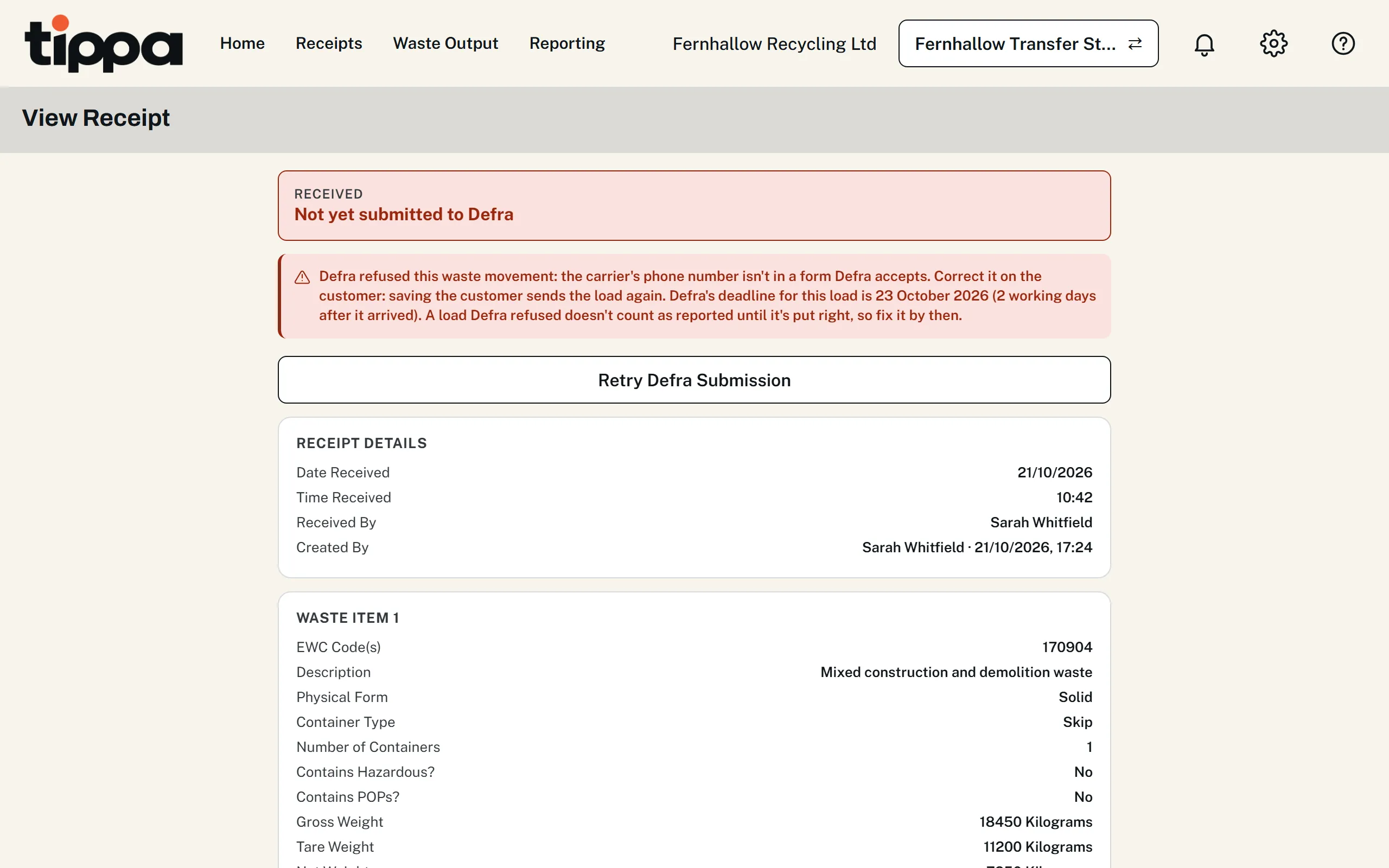
- Each load goes on its own, as soon as it's saved, so one mistake never holds up the rest, and you know in seconds rather than by email.
- Missing D or R codes aren't silent. The form says when one is missing, and the dashboard counts loads sent without one, ready to put right.
- Corrections are an edit. Change the receipt and Tippa sends the update with its Waste Tracking ID: no column B, no second upload.
This guide is general information about UK waste rules, not legal or regulatory advice. You remain responsible for meeting the duties that apply to your business; check the official guidance above and take professional advice where you need it.