
Everything Tippa does
All 89 features in one place: what each one does, who it's for, and whether it's free or which add-on it comes with. Pick your kind of business, or search for what you need.
Recording your waste and reporting every load to Defra is free, with no cap. Add-ons are £5 to £25 + VAT a month each, and each starts with a free month, with no card needed.
Recording each load
Receipts with weights
Record each load in with its gross and tare weights, and Tippa works out the net. Tares are saved for vehicles that come back, and a returning vehicle's last load is ready to repeat in one tap.
Weighbridge Home
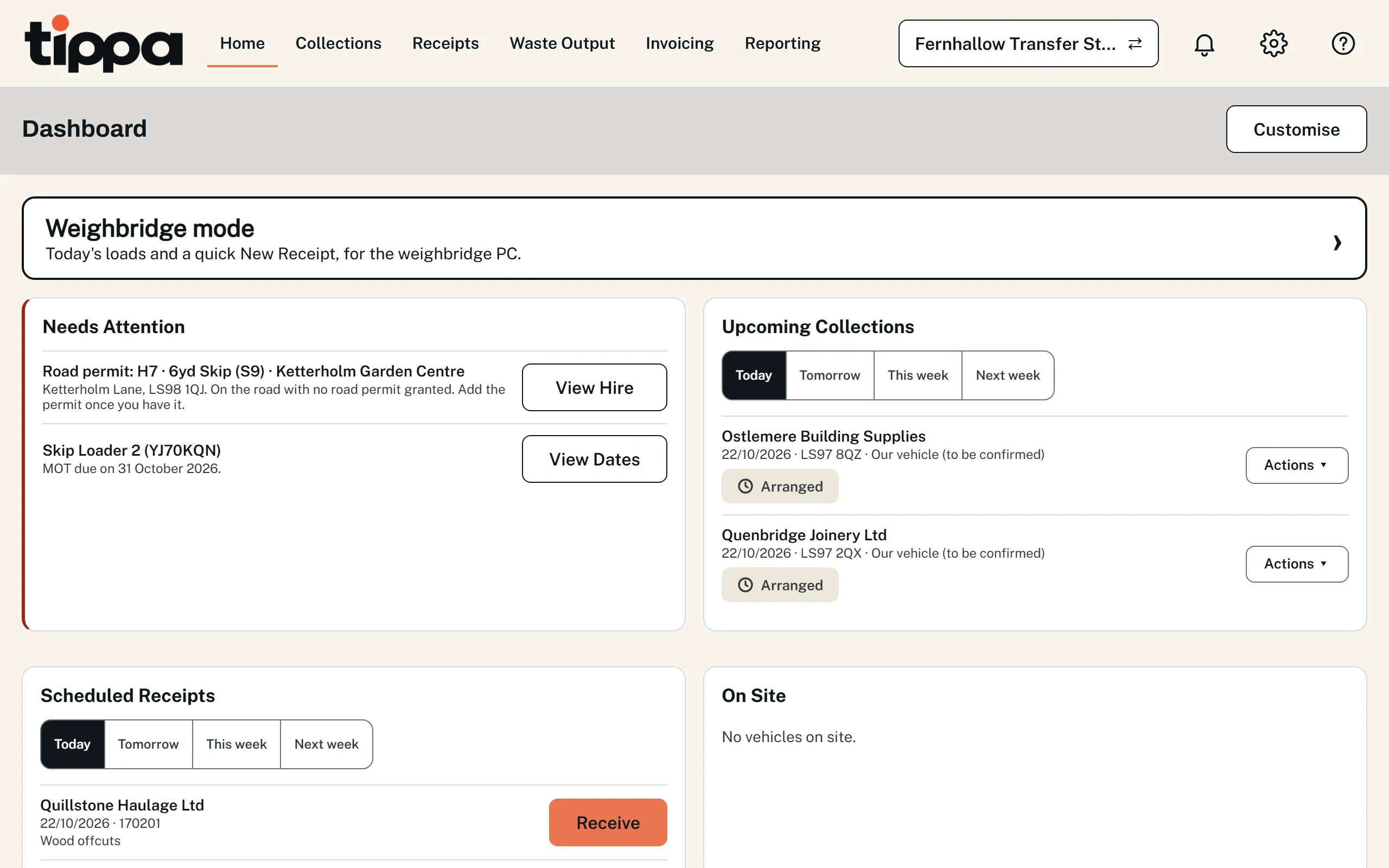
The day's planned loads, each received in one click, and a quick New Receipt that starts with the registration. Weigh a vehicle in and out and Tippa works out the net, shares it across a mixed load and remembers the tare, even with no signal. Loads going out are weighed in empty and out full. For a vehicle you don't know, take its carrier and waste (and where a load out is going) as it comes onto the bridge, so the carrier's registration is checked before it tips or loads. Each vehicle shows how long it's been on site, the day's tonnes in and out are always on screen, and on a computer the keyboard does the rest.
Weighbridge role and Weighbridge mode
Give your weighbridge operator the Weighbridge role and they see only receipts, loads out and customers at the sites they work at. Or turn on Weighbridge mode for the weighbridge PC.
Accept, reject or quarantine
Accept or reject each item in a load, or quarantine it with a deadline to resolve it. Waste turned away from one of your own vans goes back on it, and the office is alerted to send it elsewhere or back to its producer. Quarantined loads are listed on the dashboard until they're sorted.
Household drop-offs
Record waste brought in by the public, with no carrier registration needed.
Waste going out and processed on site
Record each load leaving your site, with its own pre-filled transfer note, and the waste you process on site.
More than one site
Add sites as you grow. Moving waste between your own sites creates the receiving record for you, shows when it's been delivered and received, and you can import a record from another of your sites instead of typing it again. One site is free; each extra site is £25 + VAT a month.
Photos and signatures on the record
Photos, signatures and notes are kept with each record, with who added each one. Take a photo or signature on your phone from a QR code on the computer, and it appears there within a second. A signature replaced or removed is kept, and after 30 minutes only an admin can change one, with a reason; a transfer note whose record changed after it was signed says so.
Season tickets, the new way
Set a regular receipt, movement or collection up once, daily, weekly or monthly. Your customer signs the season ticket online from a link, then each load is created for you ahead of time as its own record, with its own weight, photos and signatures. Changes part-way through are accepted the same way, Tippa prepares the renewal 30 days before the year is up and reminds your customer each week until they sign it (the loads pause at the renewal date until they do), and the signed ticket downloads with its schedule of loads for an officer. Not for hazardous waste, which needs a consignment note for every load.
Favourites and templates
Save any record as a template, and keep favourites, so the jobs you do again and again aren't typed again.
Notes read for you
Fill a receipt or collection in from a transfer or consignment note, a company's own docket, a weighbridge ticket or a certificate, as a PDF or photos from your phone, instead of typing it. Every value is checked against the note, it's read in the UK, the photos stay with the record as evidence, and Tippa learns each company's layout so their next one reads better. It can read a paper season ticket in too.
Your own container list
Keep your own containers, such as an 8 yard skip or a 1100 litre bin, each matched to one of Defra's container types, so Defra and your transfer notes still get the right code. Hide the ones you never use. Bins tipped into the lorry, such as wheelie bins, food caddies and bottle banks, reach your site's receipt as loose waste, while the collection keeps its lifts for pricing.
Collections and drivers
Arrange collections
Arrange collections from your producers, from the producer to the receiving site, and copy a regular one in a tap.
Jobs needing several loads
Waste that takes several loads to move, such as 30 tonnes of soil from a building site, is one job. Plan its loads ahead or add one on the day, and see its progress against an estimate in tonnes or loads. Each load is still a collection of its own, with its own vehicle, driver, drop-off and receipt. The producer signs the job's transfer note once, on the driver's phone at a load's collection or online from a link, and it covers every load until the job is complete, rather than a signature for every lorry. A driver taps Another load on their phone, even with no signal, and saying a load was the last completes the job and tells the office. Hazardous waste still needs a consignment note for each load, which Tippa fills in for you.
Book any registered carrier
Arrange a collection with any registered carrier. The carrier is emailed the booking and their reply comes straight back to you. When they tell you it's done, mark it collected with the date and the weights they gave you, which go on its transfer note.
Producers told when their waste moves
Each producer you collect from is told when their waste is collected, and again when it's received at one of your sites, with a link to see it and download the transfer note. By email, free, or by text or WhatsApp from your messaging balance, as their customer record says. On to start with: turn it off for everyone, or for one customer.
Unlimited drivers, free
Add as many drivers as you need at no cost. They sign in with a link, or a code sent by text, WhatsApp or email (free), with no password to remember, and see only their own work. Give a driver a one-off job when you book it and it's on their phone on the day, with no round needed. Each stop has Directions, opening the phone's own maps app.
Driver mode
An owner-driver can switch their own phone or tablet into driver mode, and an office user who also drives gets the driver's screens in the same place. Either can sign in with a driver's code, by text, WhatsApp or email, as their drivers do, and land straight in driver mode.
Signed for at the collection
Every collection has a pre-filled transfer note. The producer signs on the driver's phone, or online from an emailed link, before you arrive or afterwards if nobody was there to sign. Photos of the load are kept with it.
When a collection doesn't happen
The driver records why, with photos, and the office gets an alert straight away.
Drop off all or part of a load
Drop off a whole load, or just part of it, at a site of your choosing, with photos of where it went. Somewhere not in Tippa yet can be typed in on the spot, and is saved for next time.
Drivers told when their day changes
If the office changes a driver's day, such as closing a collection the customer cancelled, the app tells them what changed and why. In the web app, a notification on their phone tells them even with Tippa closed.
Rounds
Plan each driver's round and send it to their phone, or print it as a run sheet with no prices on it. Put a collection on a round, or move it to another, straight from the collection, copy a regular round to another day, and follow today's rounds from the office dashboard as stops are collected.
Carrier's rounds in Scotland and Northern Ireland
A round's hazardous waste from several premises can go on one consignment note as a carrier's round, filled in for you on SEPA's or NIEA's form with its carrier's schedule after it, for the driver and the office, and a reminder of when to pre-notify SEPA or DAERA.
A site and a fleet, working together
Book a collection in your own vehicle to your own site and the site sees it coming, ready to receive; receiving it records the drop-off for your driver. Waste sent out on your own vehicle or to another of your sites stays in step, and your fleet's tare weights are already there at the weighbridge.
Ready for carriers' digital waste tracking
Defra plans to bring carriers, brokers and dealers into digital waste tracking from October 2027. Tippa's collections already record the detail Defra has proposed for them.
Your fleet
Your vehicles
Your vehicles, with their tare weights kept for the weighbridge. One vehicle is free; each extra vehicle is £5 + VAT a month.
Daily vehicle checks
Drivers do their walkaround check on their phone before they set off, following DVSA's list for lorries or vans, with photos of any defects. A vehicle found unsafe is off the road until the office marks its defects fixed, saying who repaired each and when, and the office gets an alert as soon as a check finds one. Each check prints as a PDF, and the checks export as a spreadsheet, ready to show an inspector.
MOT, tax and inspection dates
Keep each vehicle's MOT, tax, safety inspection, lifting gear examination and tachograph dates in one place. Record each safety inspection with who did it, where, each defect and a photo of the signed sheet, and the next is worked out for you. A vehicle with defects not put right at the inspection is off the road until they're repaired and it's signed off as roadworthy, and the office can take any vehicle off the road. What's due in the next 14 days is on your dashboard, and rounds and the driver's phone warn about a date that has passed or a vehicle that's off the road.
Skip hire
Containers on hire
Each skip you deliver is recorded with the customer, the address, its number and its hire period, so you can see what's out, what's due back and what's overdue at a glance. Several skips for one site, of one size or more, go out in a single entry. Exchanges and take-aways are recorded by the office, or by the driver at the stop, and overdue skips show on your dashboard.
Reminders before a skip is due back
Tippa can email your customer a set number of days before a skip is due back, and the day after if it's still out, so they ring to book an exchange or a collection. Off until an admin turns it on, and customers can be left out or unsubscribe.
Deliveries and exchanges on your rounds
Book a delivery, exchange or take-away for the day it's wanted, with where to put the skip, and put it on a driver's round among their collections or give it to a driver. Their phone shows what to bring or lift and the customer's number, and they tap Delivered at the stop, even with no signal. A delivery that didn't happen on its day shows on your dashboard.
Road permits
A skip on the road keeps its road permit with it: the council, the permit number, the days it covers and what it cost. The council is suggested from the postcode, a permit is extended in a tap and carried to an exchanged skip, and the dashboard warns you before one runs out, or when there isn't one.
A register of your skips, with QR labels
List every skip you own by the number painted on it, and see which are in the yard, which are out and where, and which are out of service. Add them one at a time, a run of numbers at once, or from a spreadsheet. Print a QR label for each: the driver scans it when they deliver or exchange, and the right number goes on the hire.
Skips out on a map
See every skip that's out on a map, with the overdue ones marked, and open any of them in your phone's maps for directions.
Checks and paperwork
Pre-filled transfer notes
Every receipt, collection and load going out gets its transfer note filled in from the record, to print, email or sign on a phone: the Environment Agency's form in England and Wales, and Tippa's own in Scotland and Northern Ireland. Notes carry a customer's environmental permit or exemption. Hazardous waste is left off: it moves on its consignment note, which Tippa fills in too.
Pre-filled hazardous waste consignment notes
Every collection, load going out and receipt with hazardous waste gets its consignment note filled in from the record, to print, download or email, and the driver opens theirs on the phone to print. It's the form for where the waste is moved from: the Environment Agency's in England, Natural Resources Wales's in Wales, SEPA's in Scotland (still fillable) and NIEA's in Northern Ireland, with all its copies. The code, the producer and the process, each waste with its hazardous properties, POPs, components and UN details, the carrier and the signatures go in from what you've recorded, and Part E once the load is booked in. A carrier's round in Scotland or Northern Ireland gets one note for all its stops, with its carrier's schedule.
Hazardous properties and POPs (persistent organic pollutants)
Every waste on a receipt, collection or load going out can be marked as containing hazardous properties or POPs. Hazard codes and each POP are picked from Defra's own lists, with each component's concentration in mg/kg (more or less than a figure where a lab gives one) and where the details came from, checked against Defra's rules as you save. They go to Defra with each load you receive, on the receipt's PDF and on the consignment note, and POPs waste under a non-hazardous code, such as waste sofas under 20 03 07, is recorded the same way.
Receipt PDFs and carrier confirmations
Each receipt as a PDF, and the carrier sent a confirmation as soon as their load is received: by email with its transfer note attached, or by text or WhatsApp with a link to it.
Every carrier checked
Carrier and broker registrations are looked up on the EA, NRW, SEPA and DAERA registers when you save a record and again every night. An expired or revoked registration, or one that doesn't cover what the business does, is stopped. No number to hand? Search all four registers by the business name.
Great Britain and Northern Ireland registrations
A registration from the EA, NRW or SEPA isn't valid in Northern Ireland, nor an NIEA one in Great Britain, so a carrier working on both sides can hold one of each. Each record names the one for where it happens, and Tippa warns when a carrier has no registration for where the waste goes or where it came from.
Every permit your site holds
Add each permit and Tippa checks it on its regulator's register, then fills in the waste codes, tonnage limits and operations it allows from its standard rules (the EA's or NRW's own version) or its published permit; you can change any of it. Each load is received under the permit that allows its waste (Tippa picks it when only one does and asks when several do), waste no permit allows can't be received, nor a treatment its permit doesn't allow recorded, and searching for a waste code shows your permits' codes first. A permit that's a different operation from the rest of the site can give its own facility type, and a permit that has ended or left its register is flagged.
Moves between your permits
Moving a load from one of your site's permits to another is one form in Waste Output, with no carrier to fill in. It's received under the new permit and reported to Defra as a move within the same site.
A full history of every record
Every record shows who created it, who changed it, what each edit changed and when, and who added each photo and signature. A record keeps a carrier's details as they were at the time. Deleting a received record needs an admin and a reason, and anything removed can be restored.
Activity log
Admins get an activity log of the whole organisation: changes to records, customers, sites, vehicles and drivers, invitations, the organisation itself and your plan.
Reporting to Defra
Every load reported to Defra, free
Enter your Defra API code once and each load you receive is reported to Defra's Digital Waste Tracking service as you save it, with no spreadsheet to upload; change a receipt and the change is sent too. Defra's Waste Tracking ID is kept with each load, on the receipt, its PDF and the carrier's confirmation email. Free on every plan, with no cap on loads. Defra charges each organisation £26 a year for the service itself.
When Defra doesn't accept a load
You see it straight away, on the receipt and in your dashboard's Needs Attention, with Defra's reason. Tippa tries again every hour while Defra's service is down, emailing whoever received the load if it still hasn't gone after a day, and once a day if Defra says its charge hasn't been paid. If the load needs fixing, they're emailed, and saving the fix sends it again; or press Retry on the receipt at any time. A load not yet sent shows Defra's deadline for it.
Returns and reports
Waste returns for all four regulators
Your EA waste return, NRW's waste return, SEPA's waste data return or DAERA's waste summary return, built from your records and sent for you, not added up from paper at the end of the quarter. Each permit gets its own, quarterly or yearly as the permit says, and if records change after a return has gone, Tippa says so, so you can send a correction.
Hazardous waste returns
Your EA or NRW hazardous waste consignee return, built from the hazardous loads you've received and sent for you.
Consignment notes sent to SEPA and NIEA
SEPA and NIEA want a copy of each hazardous consignment note rather than a return, so Tippa emails each one to them as the load is booked in, including Scottish or Northern Irish waste you receive in England or Wales.
Returns to producers
In England and Wales, each producer's quarterly return of the hazardous waste you accepted from it is made on the official form and emailed to them for you, or downloaded.
Returns due, on your dashboard
Your dashboard reminds you which returns each site owes for the quarter just ended, and when each is due, including which producers are still waiting for theirs.
Mass Balance
What's on site, from what came in and went out, for the site or each permit, with each permit's storage and yearly limits and how close you are to them. Dual-coded waste such as clinical waste is shared between its codes as you set.
Tonnes in and out
Your tonnes in and out, day by day, on the dashboard, this week, this month or the last 30 days.
Reports and exports
Reports and exports of everything you've received, collected or arranged.
Waste statements for customers
Every load for a customer between two dates, with totals by waste, as a PDF to send them or an officer, or a spreadsheet.
Invoicing
Your prices, set once
Price per lift, container, item, tonne, kg, litre, cubic metre or job, per hire or per day on hire with a price for each day kept over, with minimum charges, weight allowances and landfill tax at the rate for your site's nation, kept up to date by Tippa. Use your own prices, price lists such as Trade, a customer's own or a site's, and if you both collect and receive, price the same waste per lift when you collect it and per tonne at your gate.
Monthly contracts
Charge a customer a fixed price each month for chosen container types, such as a weekly 1100 litre bin, in advance or in arrears, with a part month charged by the day. Their collections of those containers aren't charged per lift.
Invoices made as you go
Each collection or receipt goes on its customer's draft invoice as it's done, per job, weekly or monthly, with no invoices typed up at the end of the month. Check Prices lists anything that would stop a draft being sent. Send it, or let it go overnight: it's emailed with a PDF and a link to view it, or texted or sent by WhatsApp with the link, numbered with no gaps.
A job of several loads, one invoice line
A job needing several loads goes on its customer's invoice once it's complete, as one job rather than a line for every lorry. It's priced from all its loads, each weighed on its own receipt, with a charge per collection for each load and any extras added on the day, or at one price agreed for the whole job. See what it would cost on the job as it goes.
Credit notes
A credit note puts a sent invoice right: when a record changes after its invoice has gone, for a credit you give by hand, or when an invoice is voided.
Payments and what's overdue
Record payments as they come in, one payment across several invoices if need be, with anything left over kept as credit. What's paid on the day at the gate or the door (cash, card or bank transfer) is recorded with the job and set against its invoice, and a load paid at the gate prints its ticket marked PAID. See what's unpaid, what's overdue and what each customer owes.
Takings by cash, card and bank transfer
Add up what was taken on the day, by cash, card and bank transfer, for today, yesterday, this or last week or this or last month, with the jobs behind it, to check the till and card machine against. A walk-in no one's billed for counts too. The office sees every site and what was paid against invoices as well; the weighbridge sees its own site.
Gate prices for walk-ins
The weighbridge sees what to charge a walk-in: each charge for loads at its site, per tonne, item or load, with its minimum and with VAT. A load is priced as it's weighed out, before the customer is even picked, and what any job would cost ends with the total with VAT.
Statements and payment reminders
Send customers a statement of their account for any dates, by hand or to everyone with a balance on the 1st of each month. Payment reminders list a customer's overdue invoices, sent by hand or on a schedule you set.
Sales reports and your accounts
Your sales by month, customer, charge or site, and an export of your invoices, credit notes and payments as CSV files, to bring into Xero, QuickBooks, Sage or other accounts software.
Skip hire on the invoice
With Skip Hire too, each skip's hire period is billed when it's delivered, every day it's kept past its due date once it comes back, and what each road permit cost.
Invoice the producer or the carrier
Once a collection you arranged is marked collected, invoice the producer or the carrier, priced on the weights the carrier gave you.
Running the office
Receipts and invoices by text or WhatsApp
Send each customer their receipt confirmations and invoices by text or WhatsApp, as well as or instead of email (which is always free), each with a link to view and download it. 4p a WhatsApp message and 8p a text (+ VAT), from a prepaid balance an admin tops up, with auto top-up if you want it and 25 free messages to start. On the free plan too. A message that can't go is emailed instead, and one that isn't delivered costs nothing.
A dashboard you arrange yourself
What needs putting right first: loads Defra hasn't accepted, carrier registrations that have lapsed or are about to, work that's overdue, jobs that look finished, and the returns due at each site. Everyone chooses their own widgets and puts them in their own order.
Alerts
A bell on every screen for what needs you: a collection a driver couldn't make, a driver finishing a job with its last load, a vehicle check that found defects, a load Defra didn't accept, a carrier registration that's lapsed, a customer signing online, an email that bounced. Each opens the record it's about, and everyone chooses which they get.
Notifications on your phone or computer
In the web app, an alert can reach your phone or computer even with Tippa closed, never between 9pm and 7am.
Screens that keep up
Your dashboard and your repeated records update by themselves when anyone in your organisation books, edits or removes a record, a driver collects or a customer signs online, without a refresh. Driver Home shows the office's changes to a driver's day as soon as they're made.
Works without signal
Receipts, weighing in and out, collections, drop-offs and waste going out can all be recorded offline, with photos and signatures, and your lists stay searchable. Everything is sent when you're back in range, and anything that can't be saved then goes to the office to fix, so nothing is lost.
Office users and roles
Invite your office team as admins or members, and switching someone off takes effect at once. One office user is free, and another comes with each extra site; each one beyond those is £5 + VAT a month, and drivers are always free. You never have more active office users than your plan covers: to change who's active, switch one off and another on.
Every kind of business in one account
Tick every type that fits when you sign up (receiver, carrier, broker or dealer) and you get the tools for each. An admin can add or remove types later.
Nothing to install
Tippa runs in the web browser on your phone, tablet or computer.
Help when you need it
Keith, the help assistant
Tap the ? on any screen and ask Keith, Tippa's AI assistant, how to do anything. He answers in steps for the screen you're on, with buttons to open the screens he mentions, and stays beside your work while you follow them. If he can't help, report a problem from his panel and your conversation goes with it. He answers from Tippa's own help, gives no legal advice, and your questions are answered in the UK and not kept.
Report a problem or send feedback
Report a problem, with screenshots, send feedback or contact support from the Help (?) button on every screen, and the reply comes back to your own email.
Feature requests
Search what others have asked for, vote for the features you want and suggest new ones. Each request shows where it's got to, and everyone who voted is emailed when it's being built and when it's delivered.
Security and your data
Secure sign-in
Two-step sign-in, with the code from an authenticator app or sent free to your mobile by text or WhatsApp, passkeys and Google sign-in. You're emailed when two-step sign-in is turned off, its mobile is set up or removed, or a passkey is added or removed, and changing your password signs you out on your other devices.
Where your data is kept
Your records are stored in Ireland, and photos and signatures in London, encrypted, with your records backed up every day. Some of our service providers, such as payments and error reporting, may handle data elsewhere; the privacy policy lists them.
Export or delete your data
Export all your data whenever you like, and an admin can delete the whole organisation. Waste transfer records are kept for the period the law requires.
Your plan
Every add-on starts with a free month
Every add-on starts with a free month, and so do extra sites, vehicles or office users: nothing to pay, and no card needed. An admin switches one on in Manage Subscriptions, or presses Try free for a month on an add-on's card, and Tippa says what it will cost after before it starts. It works straight away for everyone in your organisation, once each (one you've had before is charged straight away), and the admins are emailed 3 days before the month is up. If you have a plan then, or have set up payment (optional: your card is saved with nothing to pay), it carries on at its usual price (for sites, vehicles and users, only the extra ones you're using); if not, it stops and nothing is charged. End a trial early at any time, also free, and nothing you made with it is deleted. When a trial of office users or sites ends, sites and vehicles are kept, but any office users over what's left are disabled, newest first, and an admin can swap who's active.
Change or cancel any time
Add or remove anything at any time, and pay or be credited for the rest of the month straight away. Cancel and you keep what you've paid for until the end of the month, then go back to the free plan, with your records kept. Lowering your office users, or cancelling, asks who stays: anyone over what the plan covers is disabled (signed out, nothing deleted), and waiting invitations that no longer fit are cancelled. Sites and vehicles are kept, but no more can be added.
Moving to Tippa
Import from a spreadsheet, with Undo
Bring your customers, sites, vehicles, past receipts and container types across, and your skips (with Skip Hire) and charges and prices (with Invoicing). Download the Excel or CSV template, fill it in or paste in your old system's export, and Tippa checks every row, carrier registrations and permits included, before anything is saved. Rows with problems come back as a file to fix, you choose whether past loads go to Defra, and you can undo an import for 7 days.
Help moving the rest of your history
Using another system now? Tell us what you use and we'll work out the move with you.
Integrations with your software
If you'd rather keep some of your current systems, such as weighbridge, accounts or job management software, we can build an integration so records pass between them and Tippa.
Start free, add what you need.
The core tools are free, with one office user, one site for receivers and one vehicle for carriers, and as many drivers as you need. Something you need isn't here? Tell us, or vote for it in Feature Requests once you've signed up.