
Free digital waste tracking software for UK waste sites
In short: Tippa reports every load your site receives to Defra’s Digital Waste Tracking service for free. There’s no cap on loads and no trial that runs out, and reporting will never be part of a paid plan. You record the load once, as it arrives, and Tippa sends it to Defra, so there’s no Defra spreadsheet to fill in and upload. The one cost you can’t avoid is Defra’s own charge of £26 a year for each organisation, which you pay Defra whatever you use.
What’s free, and for how long
Everything below is on the free plan, for as long as you use Tippa:
- Every load reported to Defra. No monthly allowance and no limit on how many. Each load is sent when you save it, and so is any change you make to it later.
- The record itself. Receipts for the waste you receive, with weights, photos, signatures and the full history, as many as you have.
- The paperwork from the same record. A filled-in waste transfer note for each load, and a hazardous waste consignment note on your nation’s own form for hazardous waste.
- Checks Defra relies on you to make. Every carrier is checked on all four UK public registers when you save them and again every night. Your site’s permit is checked on its register, with the waste codes it allows.
- Weighbridge mode for whoever books loads in, which keeps working with no signal and sends the load when it’s back.
- One site, one office user and unlimited drivers. One API code from Defra covers every site your organisation runs, so you set it up once.
What you might pay for
Reporting stays free however your business grows. What you pay for is more room, or extra tools you choose to switch on:
- Defra’s charge: £26 a year for each organisation, covering all its sites, first due by 31 January 2027. You pay it to Defra, not to Tippa, and it’s the same with Defra’s spreadsheet or any software.
- A second site or more: £25 + VAT a site a month, each with another office user. More office users: £5 + VAT a user a month. Drivers are always free.
- Add-ons, from £5 to £25 + VAT a month each, such as Waste Returns (your quarterly return to your regulator, filled in from your receipts) or Note Uploads (a receipt filled in from the carrier’s paperwork). The full list is on our pricing.
Every add-on, and an extra site or user, starts with a free month, with no card needed and nothing to pay unless you keep it. There are no adverts.
How it works
- Register with Defra. Sign in to the Report receipt of waste service with your organisation’s Government Gateway or GOV.UK One Login business account, never a personal one. Defra then gives your organisation an API code.
- Enter the code in Tippa, once. In the settings cog → Organisation Settings → Digital Waste Tracking Settings. The same screen lists what Defra will ask for when you register, from the details Tippa already holds.
- Record each load as it arrives. When you save the receipt, Tippa sends it to Defra and shows the Waste Tracking ID Defra gives back.
- Fix anything Defra flags. If Defra doesn’t accept a load, the receipt says why, where to fix it and Defra’s deadline for it, and whoever received the load is emailed. Saving the fix sends it again.
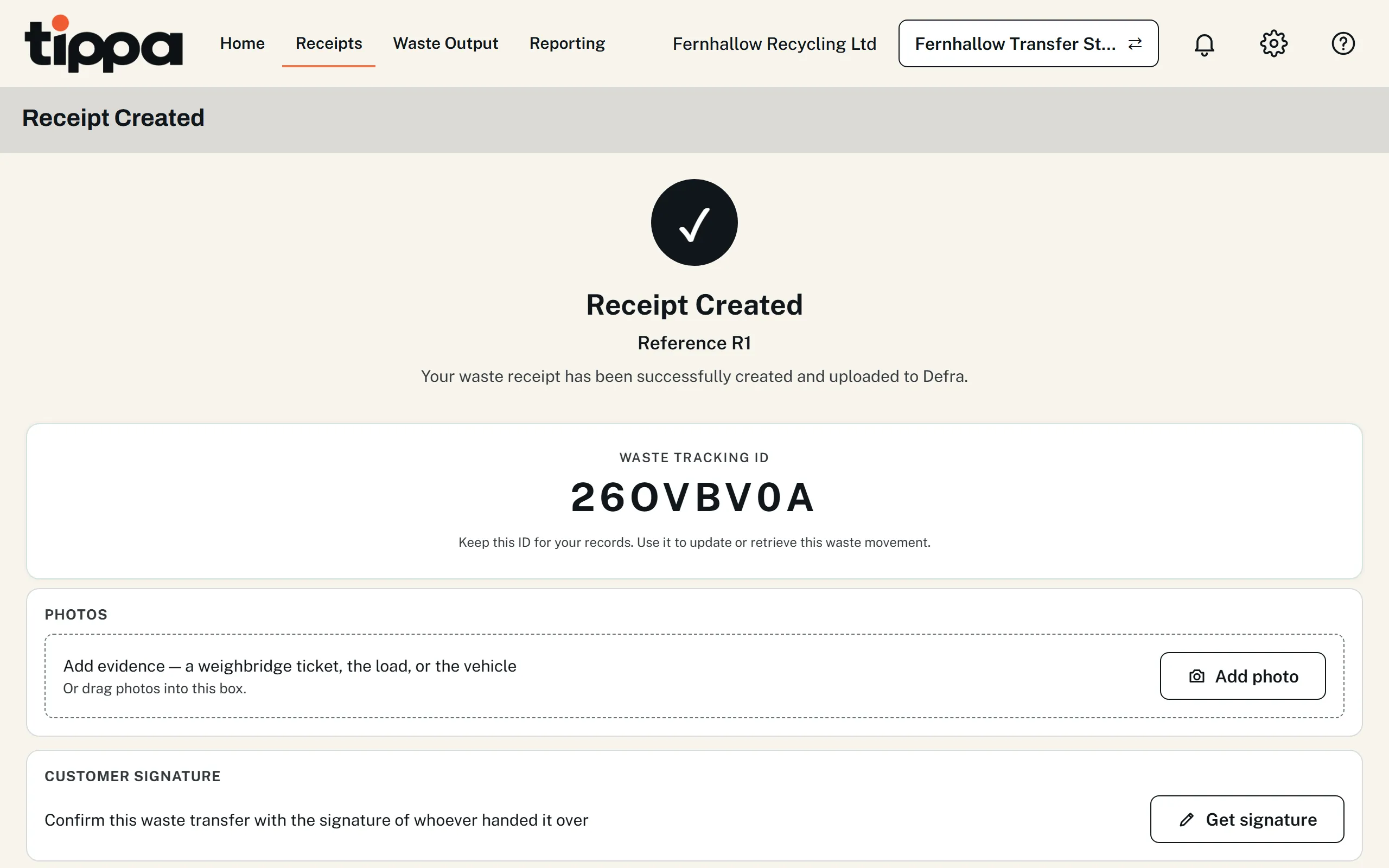
If Defra’s service is down, Tippa tries again every hour until the load is accepted. A load not yet sent shows Defra’s deadline for it: 2 working days after the day it arrived. Our step-by-step guide walks through it with screenshots and a short video.
Stop filling in Defra’s spreadsheet
If you report with Defra’s spreadsheet now, you’re keeping each load’s details twice: once in your own records and again in Defra’s template. With Tippa the record you keep is the report:
| Defra’s spreadsheet | Tippa | |
|---|---|---|
| Recording a load | A row in Defra’s template for each load (27 columns) and for each waste code (17 more), as well as your own records | The receipt you keep for the load anyway, with its codes picked from Defra’s own lists |
| Sending it | Upload the file, then start a new spreadsheet | Sent when you save the receipt, with nothing else to do |
| Mistakes | Found by Defra after you upload, marked in the file it sends back. One bad row holds up every load in the file | Most are caught on the form before it’s sent, such as a waste code, postcode or vehicle registration. If Defra still refuses a load, its receipt says why |
| Changing a load later | Only once it has a Waste Tracking ID | Edit the receipt and save it, and the change is sent |
| Transfer note | Still needed, done separately | Filled in from the same receipt, free |
| Cost | £26 a year to Defra | £26 a year to Defra; reporting in Tippa is free |
Moving across. Your customers, sites and past loads can come in from a spreadsheet with Import Records, free, using Tippa’s own template. Sending imported loads to Defra is off unless you choose it, so a load you’ve already uploaded isn’t sent twice.
The full comparison, step by step, is in our guide to reporting with the spreadsheet or software, and what each spreadsheet error means is in Defra spreadsheet errors.
Can you rely on free software?
It’s a fair question for something the law requires. Here’s what you can check for yourself:
- It’s on GOV.UK’s list. Tippa is on GOV.UK’s list of compatible software providers. That confirms a provider has technically integrated with Defra’s API. It isn’t Defra approving the software, and no software is “Defra approved”.
- We publish our test results. Defra publishes test scenarios for software that reports received waste. On 27 October 2026 Tippa passed every scenario Defra’s service checks. Our results, and the gaps we know of, are public.
- How it stays free. Tippa is paid for by the add-ons and extra sites that larger businesses choose. Reporting a load to Defra isn’t one of them, and never will be.
- Your data is yours. Records are stored in Ireland, and photos and signatures in London. You can export all your data at any time.
Whatever software you use, reporting each load correctly and on time stays your legal duty as the operator of a permitted site (regulation 4 of the Digital Waste Tracking (England) Regulations 2026, and the same in Wales and Scotland).
Other free ways to report
Defra’s spreadsheet. The template is free to download: you fill in a row for each load and each waste code, and upload it. It can be enough for a site taking a handful of loads. You start a new spreadsheet after every submission, and Defra calls it a temporary solution, expected to stay until at least October 2027. How it compares with Tippa is above.
Other software. A few other products have a free option, and most charge for reporting to Defra or limit it. Our comparison of waste site software shows what each product’s own website says it offers for free. Before choosing any of them, our checklist has the questions to ask.
Who has to report, and from when
| Nation | Permitted sites receiving waste |
|---|---|
| England | From 1 October 2026 |
| Wales | From 1 October 2026 |
| Scotland | From 1 January 2027 |
| Northern Ireland | January 2027, as DAERA has announced; the regulations to make it law haven’t been published yet |
Waste carriers, brokers and dealers are planned to follow from October 2027. Tippa reports received loads for sites in all four nations, so a site in Scotland or Northern Ireland can start before it has to. Every date, with its source, is in our digital waste tracking timeline.
Common questions
Is Tippa’s digital waste tracking really free?
Yes. Reporting every load you receive to Defra costs nothing in Tippa, on every plan, with no cap and no trial period. Defra charges each organisation £26 a year for the service itself, which you pay to Defra.
Is there a limit on how many loads I can report free?
No. There’s no monthly allowance: every load you receive is reported, however many there are.
Do I need a paid plan for more than one site?
The free plan includes one site. Each extra site is £25 + VAT a month, and reporting stays free for all of them. One API code from Defra covers every site your organisation runs.
Is Tippa approved by Defra?
Defra doesn’t approve software. Tippa is on GOV.UK’s list of compatible software providers, which confirms it has technically integrated with Defra’s API, and publishes its results in Defra’s test scenarios.
Where do I enter my Defra API code?
In the settings cog → Organisation Settings → Digital Waste Tracking Settings. You enter it once, and every load from then on is sent.
Check the official guidance
This page is based on these sources. Rules change, so check them for the latest position.
- Report receipt of waste (GOV.UK / Defra)
- Digital waste tracking: check if you need to report the waste you receive (GOV.UK / Defra)
- Report receipt of waste: choose a software provider (GOV.UK / Defra)
- Developing the digital waste tracking service (GOV.UK / Defra)
- The Digital Waste Tracking (England) Regulations 2026 (legislation.gov.uk)
- The Digital Waste Tracking (Wales) Regulations 2026 (legislation.gov.uk)
- The Digital Waste Tracking (Scotland) Regulations 2026 (legislation.gov.uk)
- Digital Waste Tracking (DAERA)
Start reporting to Defra, free
Sign up, add your site and its permit, and enter your Defra API code. From then on, every load you record is reported for you.
- Every load reported free, with no cap, on every plan.
- A transfer note filled in from the same receipt, free.
- Tries again by itself while Defra’s service is down.
- No card needed to sign up.
This page is general information about UK waste rules, not legal or regulatory advice. You remain responsible for meeting the duties that apply to your business; check the official guidance above and take professional advice where you need it.